Tuesday, June 23, 2015

Abstract Class

The purpose of abstract class is to provide default functionality to its sub classes.

When a method is declared as abstract in the base class then every derived class of that class must provide its own definition for that method.

An abstract class can also contain methods with complete implementation, besides abstract methods.
When a class contains at least one abstract method, then the class must be declared as abstract class

It is mandatory to override abstract method in the derived class.
When a class is declared as abstract class, then it is not possible to create an instance for that class.

They are commonly used when you want to define a template for a group of subclasses that share some common implementation code, but you also want to guarantee that the objects of the superclass cannot be created.

Use abstract classes when you are defining behaviour for a class in your class heirarchy that is never going to be used to instantiate an object directly.  

Cannot instantiate abstract class. The important part of an abstract class is that you can never use it separately from a derived class. Therefore in Main you cannot use the new Test() constructor.

Compared to an interface, it adds features and improves performance.

Features of Abstract Class

  1. An abstract class cannot be instantiated.
  2. An abstract class contain abstract members as well as non-abstract members.
  3. An abstract class cannot be a sealed class because the sealed modifier prevents a class from being inherited and the abstract modifier requires a class to be inherited.
  4. A non-abstract class which is derived from an abstract class must include actual implementations of all the abstract members of parent abstract class.
  5. An abstract class can be inherited from a class and one or more interfaces.
  6. An Abstract class can has access modifiers like private, protected, internal with class members. But abstract members cannot have private access modifier.
  7. An Abstract class can has instance variables (like constants and fields).
  8. An abstract class can has constructors and destructor.
  9. An abstract method is implicitly a virtual method.
  10. Abstract properties behave like abstract methods.
  11. An abstract class cannot be inherited by structures.
  12. An abstract class cannot support multiple inheritance
Reference Link :

Monday, December 3, 2012

Install named instance of sqlserver using batch file

Be aware of the quotes.
ExecWait '"$TEMP\SQLEXPR.EXE" /Silent /INSTANCENAME=SQLEXPRESS ADDLOCAL=All PIDKEY=ABCDE12345FGHIJ67890KLMNO SAPWD=StrongPassword SQLACCOUNT=SQLEXPRESS\bla SQLPASSWORD=blabla AGTACCOUNT=SQLEXPRESS\bla AGTPASSWORD=blabla SQLBROWSERACCOUNT=sqlexpress\bla SQLBROWSERPASSWORD=blabla'

Need to delete Files having more than 3 Underscores ( _ )

Try this code may help u .


void deleteFiles() 
{
DirectoryInfo objDir = new DirectoryInfo(@"D:\");
FileInfo[] objFileList = objDir.GetFiles();
foreach(FileInfo f in objFileList)
{
if (f != null)

if (f.Name.Split('_').Length > 3)
{
f.Delete();
}
}
});


Wednesday, August 8, 2012

E Books For Shrepoint

Please go through this link to download Large collection of Free Microsoft eBooks, including: SharePoint, Visual Studio, Windows Phone, Windows 8, Office 365, Office 2010, SQL Server 2012, Azure, and more for free


http://blogs.msdn.com/b/mssmallbiz/archive/2012/07/27/10334262.aspx

Monday, June 25, 2012

VB^ Code for File OPerations

Public Function DeleteFile(strPath As String) As String
On Error GoTo Error
If FSO.FileExists(strPath) Then
FSO.DeleteFile (strPath)
End If
Error:
MsgBox ("DeleteFile : " & Err.Description)
End Function
Public Function MoveFile(ByVal strSrcPath As String, ByVal strDestPath As String) As String
On Error GoTo Error
If FSO.FileExists(strSrcPath) Then
FSO.MoveFile strSrcPath, strDestPath

End If
Error:
MsgBox ("MoveFile : " & Err.Description)
End Function
Public Function ReadFile(ByVal strFilePath As String) As String
On Error GoTo Error
Dim strOutput As String
If FSO.FileExists(strFilePath) = False Then
Exit Function
End If
Dim nFileNum As Integer, sText As String, sNextLine As String, lLineCount As Long
nFileNum = FreeFile
Open strFilePath For Input As nFileNum
lLineCount = 1
' Read the contents of the file
Do While Not EOF(nFileNum)
   Line Input #nFileNum, sNextLine
   'do something with it
   'add line numbers to it, in this case!
   sNextLine = sNextLine & vbCrLf
   sText = sText & sNextLine
Loop
strOutput = sText

Error:
MsgBox ("ReadFile : " & Err.Description & strOutput)
End Function
Public Function WriteFile(strFilePath As String, strToWriteFilePath As String) As String
On Error GoTo Error
Dim strOutput As String
If fso.FileExists(strFilePath) = False Then
Exit Function
End If
Dim nFileNum As Integer, sText As String, sNextLine As String, lLineCount As Long
nFileNum = FreeFile
Open strFilePath For Input As nFileNum
lLineCount = 1
' Read the contents of the file
Do While Not EOF(nFileNum)
   Line Input #nFileNum, sNextLine
  
   sNextLine = sNextLine & vbCrLf
   sText = sText & sNextLine
Loop
strOutput = sText
Dim newFIle
Set fso = CreateObject("Scripting.FileSystemObject")
 Set newFIle = fso.CreateTextFile(strToWriteFilePath, True, False)
newFIle.Write strOutput


Error:
MsgBox ("WriteFile : " & Err.Description & strOutput)
End Function

Sunday, June 10, 2012

File Upload using FtpWebRequest in .Net C#

Namespace used:
  1. using System.Net;   
  2. using System.IO;  

Sample Code:
  1. public void ftpfile(string ftpfilepath, string inputfilepath)   
  2. {   
  3.     string ftphost = "127.0.0.1";   
  4.     //here correct hostname or IP of the ftp server to be given   
  5.   
  6.     string ftpfullpath = "ftp://" + ftphost + ftpfilepath;   
  7.     FtpWebRequest ftp = (FtpWebRequest)FtpWebRequest.Create(ftpfullpath);   
  8.     ftp.Credentials = new NetworkCredential("userid""password");   
  9.     //userid and password for the ftp server to given   
  10.   
  11.     ftp.KeepAlive = true;   
  12.     ftp.UseBinary = true;   
  13.     ftp.Method = WebRequestMethods.Ftp.UploadFile;   
  14.     FileStream fs = File.OpenRead(inputfilepath);   
  15.     byte[] buffer = new byte[fs.Length];   
  16.     fs.Read(buffer, 0, buffer.Length);   
  17.     fs.Close();   
  18.     Stream ftpstream = ftp.GetRequestStream();   
  19.     ftpstream.Write(buffer, 0, buffer.Length);   
  20.     ftpstream.Close();   
  21. }  

Function can be used as
  1. ftpfile(@"/testfolder/testfile.xml", @"c:\testfile.xml");  

Reference :http://blog.logiclabz.com/c/ftp-file-upload-using-ftpwebrequest-in-net-c.aspx


Code to check Directory exists in ftp or not

private void btnCheck_Click(object sender, EventArgs e)
        {
            bool result = FtpDirectoryExists("ftp://micro123/First", "anonymous", "anonymous");
            MessageBox.Show("Folder"+result);
        }
        public bool FtpDirectoryExists(string directoryPath, string ftpUser, string ftpPassword)
        {
            bool IsExists = true;
            try
            {
                FtpWebRequest request = (FtpWebRequest)WebRequest.Create(directoryPath);
                request.Credentials = new NetworkCredential(ftpUser, ftpPassword);
                request.Method = WebRequestMethods.Ftp.PrintWorkingDirectory;

                FtpWebResponse response = (FtpWebResponse)request.GetResponse();
            }
            catch (WebException ex)
            {
                IsExists = false;
            }
            return IsExists;
        }
 

Sunday, May 20, 2012

 Ajax with Java script

Here is the link - http://sdrv.ms/DevCon2012-ClientSideScriptingControls
Access Viewstate from javascript in ASP.net

1)<input type="hidden" name="__VIEWSTATE" id="__VIEWSTATE" value="..." />
var vCode = documents.forms[0]['__VIEWSTATE'].Value;
alert(dateView);

2)var viewState = document.getElementsByName('__VIEWSTATE');
or
var viewState = document.document.getElementById(('__VIEWSTATE')

3)This code explains how to access VIEWSTATE hidden field value from javascript which is in encrypted format. How do we decrypt it? var key_value = ‘<%=ViewState[“Key_Name”] %>’

Tuesday, February 28, 2012

Oracle related Issues

1:- In cmd check "echo %PATH%"  to get the environment variables with path .
2:-Start - Run - %windir%\SysWOW64\odbcad32.exe to get the providers registered with 32 bit.
3:-First time we r installing Oracle client need to configure tns names through NetConfigurationWizard.It will generate one tnsnames file in that specific location .IT contains the server name and all details.

Export to CSV

HttpContext.Current.Response.Clear()
HttpContext.Current.Response.Buffer =
TrueHttpContext.Current.Response.AddHeader(
HttpContext.Current.Response.Charset =
"content-disposition", "attachment;filename=GLAmountsExport.csv")""HttpContext.Current.Response.ContentType = "application/text"
dt = GetXRefDataPageWise()
Dim dt As DataTable' GridView1.AllowPaging = False' GridView1.DataBind()

sb.Append(dt.Columns(k).ColumnName +
Dim sb As New StringBuilder()For k As Integer = 0 To dt.Columns.Count - 1","c)Nextsb.Append(vbCr & vbLf)


sb.Append(dt.Rows(i)(k).ToString +
For i As Integer = 0 To dt.Rows.Count - 1For k As Integer = 0 To dt.Columns.Count - 1","c)Nextsb.Append(vbCr & vbLf)
NextHttpContext.Current.Response.Output.Write(sb.ToString())
HttpContext.Current.Response.Flush()
HttpContext.Current.Response.End()

Need to add  ","+c to display the values correctly in csv file .

Wednesday, February 8, 2012

IIS 7.0 Regarding issue in asp.Net Application

Junk data when convert binary to string

Here is the example :
Step 1: when I convert this string to binary I got the below output.
SELECT CONVERT(varbinary(max), '(DAYSBETWEENREADINGS(''SNOT'') * 100 / 365)')
Output:
0x28444159534245545745454E52454144494E47532827534E4F542729202A20313030202F2033363529

But in the table from which I am trying to convert binary to string I am having other than this, but sql server still returning the same string.

select CONVERT(varchar(max), 0x28444159534245545745454E52454144494E47532827534E4F542729202A20313030202F203336352900080030000000000000000000000000000000FFFF010000001C0001000000000000000000000000000000060007002A0000000000000000000000000000000100030000002B000200000000000000000000000000020000000000280001000000000000000000000000000100020000001A0000000000000000005940000000000100000000001B0001000000000000000000000000000100040005001A0000000000000000D076400000000001000000000002002800000000000000000000002B00140000000000000000001900444159534245545745454E52454144494E475300534E4F540000)
OutPut:
(DAYSBETWEENREADINGS('SNOT') * 100 / 365)


How to truncate the unnecessary sequence from binary data?


Solution :

For i = 0 To ds.Tables(t).Rows.Count - 1
                    dr = dt.NewRow()
                    For j As Integer = 0 To ds.Tables(t).Columns.Count - 2
                        If Not IsDBNull(ds.Tables(t).Rows(i)(j)) Then
                            If ds.Tables(t).Columns(j).DataType.Name = "Byte[]" Then

                                ss = "select convert(varchar(max),convert(varbinary(max),@byteArray)) as binarystr;"
                                cmd = New SqlCommand(ss.ToString, conn)
                                da1 = New SqlDataAdapter(cmd)
                                commonds = New DataSet
                                cmd.Parameters.Add("@byteArray", Data.SqlDbType.Image).Value = ds.Tables(t).Rows(i)(j)
                                da1.Fill(commonds)
                                If commonds.Tables(0).Rows.Count > 0 Then
                                    binarystr = commonds.Tables(0).Rows(0).Item(0)
                                    dr(j) = binarystr.Substring(0, binarystr.IndexOf(vbNullChar)) ‘We just done the substring, with the vbnullchar.

                                End If
                            Else
                                dr(j) = ds.Tables(t).Rows(i)(j)
                            End If
                        End If
                        commonds.Dispose()
                    Next
                    dt.Rows.Add(dr)
                Next
            Next
                     DataGridView1.DataSource = dt

IIS 6 Metabase and IIS 6 Configuration Compatibility

Getting this error when we are trying to open a .Net web application  in windows 7 .

 To access local IIS Web sites, we need to run Visual Studio in the context of an administrator account

  •     In Windows 7 or Vista , click Start, click All Programs, and then locate Visual Studio.
  •     Right-click Microsoft Visual Studio, and then click Run as administrator.


you need to install the "IIS Metabase and IIS6 Configuration Compatibility" feature under Internet Information Services-Web Management Tools-IIS 6 Management Capability to get the IIS6 ADSI provider installed.

  • First of all , you should have sufficient administrative access to turn or turn off windows features.

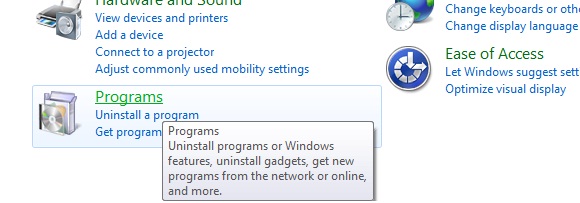
  • If you have the admin previliges , Please go to control panel in Windows and select Programs as shown in figure below.


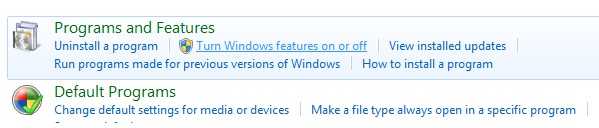
  • In the settings page that opens, please select Turn windows features on or off .

  • Now go to Internet Information Services and then :
    • Expand Web Management Tools, expand IIS 6 Management Compatibility, and then select the IIS 6 Metabase and IIS 6 configuration compatibility check box.
    • Expand World Wide Web Services, expand Application Development Features, and then select the ASP.NET check box.
    • Expand World Wide Web Services, expand Security, and then select the Windows Authentication check box.
    • To enable Visual Studio to debug applications, you must configure IIS 7.0 with the Windows Authentication module. By default, the module is not configured as part of IIS.
    • Click OK to start the IIS and ASP.NET installation process.
    •  If you have resolved the above two, and still get the third error, Your project has been configured to work with IIS. Either you dont have IIS 6 metabase installed or your virtual directory is not configured as a application.

       This is something very smallish but this is something that IIS 7 + has brought in. Well in IIS 6 its just a virtual directory setup thats enough to run a application. But in IIS 7 , you have to make it as a application as well.
       Right click on your virtual directory and click on Convert to Application and you should get rid of this.


  • Wednesday, February 1, 2012

    Code to create & Write to a Text file

    Below code is to create and write text to a text file


     string mydocpath = Environment.GetFolderPath(Environment.SpecialFolder.MyDocuments);
                string fileLoc = mydocpath + @"\myEventLogSource_Pathwaytest.txt";
                StreamWriter sw;
                if (!File.Exists(fileLoc))
                {
                    sw = new StreamWriter(File.Open(fileLoc, FileMode.Create));               }
                else
                {
                    sw = new StreamWriter(File.Open(fileLoc, FileMode.Append));
                }  
    sw.Write("Hello");
    sw.Dispose();

    Friday, January 27, 2012

    SSRS Setup creation

    Refer :

    1:Download  RS Scripter Tool
    http://www.sqldbatips.com/showarticle.asp?ID=62
    2:http://weblogs.asp.net/akjoshi/archive/2009/01/29/using-rs-scripter-to-create-deployment-script-for-reporting-services.aspx


    Wednesday, January 18, 2012

    Best site for EBook downloads for .Net

    http://www.ebookee.biz/mcpd-70-519-exam-ref-designing-and-developing-web-applications-using-microsoft-net-framework-4.html#more-2242