Wednesday, December 14, 2011

How to call a SOAP web service in .NET 4.0 C# without using the WSDL or proxy classes

If you want to call a .NET 4.0 C# web service, without using the WSDL or “Add Service Reference” in Microsoft Visual Studio 2010. You can use the following functions:
/// <summary>
/// Execute a Soap WebService call
/// </summary>
public override void Execute()
{
    HttpWebRequest request = CreateWebRequest();
    XmlDocument soapEnvelopeXml = new XmlDocument();
    soapEnvelopeXml.LoadXml(@"<?xml version=""1.0"" encoding=""utf-8""?>
<soap:Envelope xmlns:soap=""http://schemas.xmlsoap.org/soap/envelope/"" xmlns:xsi=""http://www.w3.org/2001/XMLSchema-instance"" xmlns:xsd=""http://www.w3.org/2001/XMLSchema"">
<soap:Body>
    <HelloWorld3 xmlns=""http://tempuri.org/"">
        <parameter1>test</parameter1>
        <parameter2>23</parameter2>
        <parameter3>test</parameter3>
    </HelloWorld3>
</soap:Body>
</soap:Envelope>");

    using (Stream stream = request.GetRequestStream())
    {
        soapEnvelopeXml.Save(stream);
    }

    using (WebResponse response = request.GetResponse())
    {
        using (StreamReader rd = new StreamReader(response.GetResponseStream()))
        {
            string soapResult = rd.ReadToEnd();
            Console.WriteLine(soapResult);
        }
    }
}
/// <summary>
/// Create a soap webrequest to [Url]
/// </summary>
/// <returns></returns>
public HttpWebRequest CreateWebRequest()
{
    HttpWebRequest webRequest = (HttpWebRequest)WebRequest.Create(@"http://dev.nl/Rvl.Demo.TestWcfServiceApplication/SoapWebService.asmx");
    webRequest.Headers.Add(@"SOAP:Action");
    webRequest.ContentType = "text/xml;charset=\"utf-8\"";
    webRequest.Accept = "text/xml";
    webRequest.Method = "POST";
    return webRequest;
}
Result
<?xml version="1.0" encoding="utf-8"?><soap:Envelope xmlns:soap="http://schemas.xmlsoap.org/soap/envelope/" xmlns:xsi="http://www.w3.org/2001/XMLSchema-instance" xmlns:xsd="http://www.w3.org/2001/XMLSchema"><soap:Body><HelloWorld3Response xmlns="http://tempuri.org/"><HelloWorld3Result>test</HelloWorld3Result></HelloWorld3Response></soap:Body></soap:Envelope>

You can use complex types in you’re request. I use fiddler to get the contents of the soap envelope.

Wednesday, November 30, 2011

Checking Excel file is open or not in (In Shared mode also)

 Below is the code ,where i am checking a specified file is opened or not and if opened i am closing or else deleting.

There is no built in functionality in .Net to check ISFILEOPEN.
So we are forcebily trying to read the ,so if its not opened it will through a exception & there we can write the code for if file is not opened.
Using f As New IO.FileStream("C:\1.xlsx", FileMode.Open, FileAccess.ReadWrite, FileShare.None)

If the  file is in shared mode we have to check as below
Using f As New IO.FileStream("C:\1.xlsx", FileMode.Truncate, FileAccess.ReadWrite, FileShare.None)

Filemode.truncate will check it in shared mode.


  Dim thisFileInUse As Boolean = False
            If System.IO.File.Exists("C:\1.xlsx") Then
                Try
                    Using f As New IO.FileStream("C:\1.xlsx", FileMode.Open, FileAccess.ReadWrite, FileShare.None)
                        ' thisFileInUse = False
                    End Using
                    IO.File.Delete("C:\1.xlsx")
                Catch

                    thisFileInUse = True
                    nFiles = excel.Workbooks.Count
                    For iVar = 1 To nFiles
                        If UCase(excel.Workbooks(iVar).Path & "\" & excel.Workbooks(iVar).Name) = UCase("C:\1.xlsx") Then
                            excel.Workbooks(iVar).Close()

                        End If
                    Next
                End Try
            End If

Tuesday, November 29, 2011

SQL Bulk Update from Excel


Below is the sample code in C# for bulk upload of data from excel to Sql Server table.
Steps:
1-Write connection string for Sql Database
2-Coonection string for Excel sheet
3-Query to get required Data from excel sheet
4-If we need specific data from excel sheet then we can mention as FROM [Sheet1$A3:o12],So that it will read from A3 upto o12
5-Fille that data into one dataset
6-If need to do any filteration on the excel data we can do on that dataset using dataview rowfilter
7-Using column mapping ,fill the excel data into sql database table
8-Column mapping is required to specify the excel column name to Sql table column name
9-Destination table name should be specified .

 
Imports System.Data.SqlClient
Imports System.Data.OleDb
Imports System.Text.RegularExpressions
Imports System.IO
Imports System.Data

Partial Class _Default
    Inherits System.Web.UI.Page

    Protected Sub Button1_Click(ByVal sender As Object, ByVal e As System.EventArgs) Handles Button1.Click
        Try
            Dim con As String = "Write your connection string to connect sql database"

            Dim sqlcon As SqlConnection = New SqlConnection(con)

            If Not FileUpload1.HasFile Then

                Return
            End If
            Dim PathName As String = ""

            If FileUpload1.HasFile Then

                Dim filepath As String = FileUpload1.PostedFile.FileName
                Dim pat As String = "\\(?:.+)\\(.+)\.(.+)"
                Dim r As New Regex(pat)
                'run
                Dim m As Match = r.Match(filepath)
                Dim file_ext As String = m.Groups(2).Captures(0).ToString()
                Dim filename As String = m.Groups(1).Captures(0).ToString()
                Dim file As String = filename & "." & file_ext

NOTE 'Below code is to save the Excel file in local folder'
NOTE 'Its not mandatory'

                FileUpload1.PostedFile.SaveAs(Server.MapPath("Uploads\") & file)
 
                PathName = Server.MapPath("Uploads\") & file
            End If
 'Below is the connection string for excel sheet'

            Dim connection As OleDbConnection = New OleDbConnection("Provider=Microsoft.Jet.OleDb.4.0;Data Source=" + PathName + ";Extended Properties=Excel 8.0;")
          
'Below is Query for excel data'

            Dim oleAdapter As OleDbDataAdapter = New OleDbDataAdapter("Select '0' as BatchID,'0' as BatchDate,* FROM [Sheet1$] ", connection)
            Dim dsk As New DataSet
            oleAdapter.Fill(dsk)

            Dim excelData As New DataTable("ExcelData")
            exceldata = dsk.Tables(0)

            If sqlcon.State = ConnectionState.Closed Then
                sqlcon.Open()
            End If


            Using copy As New SqlBulkCopy(sqlcon)
                
NOTE 'Below is the code for mapping Source or Excel table to Destination or Sql database table'

                'copy.ColumnMappings.Add("BatchID", "BatchID")
                'copy.ColumnMappings.Add("BatchDate", "BatchDate")
                'copy.ColumnMappings.Add("compPartNumber", "compPartNumber")
                'copy.ColumnMappings.Add("PoUnitPrice", "PoUnitPrice")
               

                copy.DestinationTableName = "Give the destination table name"
                copy.WriteToServer(excelData)

            End Using

        Catch ex As Exception

        End Try
    End Sub
End Class

Tuesday, November 15, 2011

Windows Azura Version 1.6 Released

Windows Azure SDK for .NET – November 2011 (Version 1.6)–Released

Microsoft has released latest version of Windows Azure SDK for .NET – November 2o11 – Version 1.6.
Windows Azure SDK for .NET, which include SDKs, basic tools, and extended tools for Microsoft Visual Studio 2010.
Latest Windows Azure SDK 1.6 includes the following new features:
  • Windows Azure Libraries for .NET
    • Improved Service Bus and Caching capabilities and performance.
    • New service management APIs for storage.
  • URL Rewrite 2.0
  • Windows Azure Emulator – November 2011
    • Performance Improvements to compute & storage emulators.
  • Windows Azure Authoring Tools – November 2011
  • Windows Azure SDK 1.6 Build 1.6.41103.1601
  • Windows Azure Tools for Visual Studio 2010 SP1 – November 2011
    • Streamlined publishing: Easily connect your environment to Windows Azure by downloading a publish settings file for your account. You can then configure all aspects of deployments, such as Remote Desktop (RDP), without ever leaving Visual Studio. By default, publish will make use of in-place deployment upgrades for significantly faster application updates.
    • Multiple profiles: Your publish settings, build config, and cloud config choices will be stored in one or more publish profile MSBuild files. This makes it easy for you and your team to quickly change all your environment settings.
    • Team Build: The Windows Azure Tools for Visual Studio 2010 now offer MSBuild command-line support to package your application and pass in properties. Additionally they can be installed on a lighter-weight build machine without the requirement of Visual Studio being installed.
    • Visual Studio now allows you to make improved in-place updates to deployed services in Windows Azure.
    • Improved robustness of Remote Desktop Connectivity to Windows Azure VMs.
  • Windows Azure SDK for .NET – November 2011
  • ASP.NET MVC3 Tools Update Installer
Official Announcement: http://blogs.msdn.com/b/windowsazure/archive/2011/11/14/updated-windows-azure-sdk-amp-windows-azure-hpc-scheduler-sdk.aspx
DOWNLOADS :
The release includes the following components for download (for diff processor architecture platforms)
WindowsAzureEmulator-x64.exe Download ( Windows Azure Developer Emulator for Windows x64 )
WindowsAzureEmulator-x86.exe Download ( Windows Azure Developer Emulator for Windows x86 )
WindowsAzureLibsForNet-x64.msi Download ( Necessary libraries for .NET Development in Windows X64 )
WindowsAzureLibsForNet-x86.msi Download ( Necessary libraries for .NET Development in Windows x86 )
WindowsAzureSDK-x64.msi Download (Windows Azure SDK – for Win64)
WindowsAzureSDK-x86.msi Download (Windows Azure SDK – for Winx86)
WindowsAzureTools.VS100.exe Download (Windows Azure tools v1.6 for Visual Studio 2010)
also you can install necessary software’s for Windows Azure development using the Web Platform Installer here: http://go.microsoft.com/fwlink/?LinkID=156784
Ref Courtesy & More info available at:
http://blogs.msdn.com/b/windowsazure/archive/2011/11/14/updated-windows-azure-sdk-amp-windows-azure-hpc-scheduler-sdk.aspx
11/16/2011 Blog Update 1 : Windows Azure Platform Training Kit also available.
Windows Azure Platform Training Kit – November Update
Windows Azure Platform Training Kit includes a comprehensive set of technical content to help you learn how to use Windows Azure platform.

If you are looking forward to try out Windows Azure Trial account. Try this 90 DAY trial offer http://www.microsoft.com/windowsazure/free-trial/
 

Programcall Link

Monday, August 15, 2011

Access problem while Copying & moving content of a file from one folder to another folder

Hi All,


This below code is to read the content of a file & moving that file from one folder to another folder
in vb.net.


Protected Sub Button1_Click(ByVal sender As Object, ByVal e As System.EventArgs) Handles Button1.ClickDim di As New IO.DirectoryInfo("D:\Test")Dim diar1 As IO.FileInfo() = di.GetFiles()Dim dra As IO.FileInfoDim fs As System.IO.FileStreamDim sr As StreamReaderDim line As String = ""
For Each dra In diar1'fs = New FileStream(di.ToString + "\" + dra.ToString, FileMode.Open, FileAccess.Read)fs =
sr =


New FileStream(di.ToString + "\" + dra.ToString, FileMode.Open, FileAccess.Read, FileShare.Read)New StreamReader(fs)Dim LineCount As Integer = 0While Not (sr.EndOfStream())'line = sr.ReadToEnd()line = sr.ReadLine()
LineCount += 1
End Whilefs.Close()
NextMoveProcessedFiles(
"D:\Test\", "D:\Test1", "Test.txt")End Sub
Sub MoveProcessedFiles(ByVal StrSourceFilePath As String, ByVal StrTargetDir As String, ByVal strFileName As String)Dim oldFile, newFile, TargetDir As StringTryoldFile = StrSourceFilePath + strFileName
TargetDir = StrTargetDir
newFile = TargetDir +
"\" + strFileNameIf Not File.Exists("D:\Test1\" + strFileName) Then
theFile.Close()
File.Delete(newFile)
File.Move(oldFile, newFile)
Dim theFile As FileStream = File.Create("D:\Test1\" + strFileName)End If

Catch ex As Exception'MsgBox(ex.Message)FinallyEnd Try


Access problem while Copying & moving content of a file from one folder to another folder is solved  if we use filestream to create a file .

End Sub

all integers are displayed in hex format during debugging in vb.net

Hi All,

This is an uncommon problem during debugging .
All integer values will be displayed in hex format.

Solution:

While debugging ,right click to get Quickwatch window & in that window right click
and unselect Hexadecimal display.


Wednesday, June 8, 2011

Sql Server 2008 Database Diagrams


SQL Server Database Diagram is visual model of a database. We can use only Tables in SQL Server database diagrams. Any changes made outside Database Diagram designer will reflect automatically in the diagram and vice versa.

We can create them using built-in SQL Server Database Diagram designer tool in SQL Server Management Studio. There is no Undo and Redo option, so we need to be careful when deleting columns or removing relationships

Database Diagrams are stored in dbo.sysdiagrams system table in the database we are creating diagram. This table will be created automatically, when we create the first database diagram in the database.

we can copy the diagram by copy the data of dbo.sysdiagrams table from source database to destination database, but the tables in the diagram should exist in the destination database or else while viewing or modifying the diagram, we will get the below error and corresponding tables will be removed from the diagram
“Table(s) were removed from the diagram because privileges were removed to these table(s) or the table(s) were dropped.

Query to copy database diagrams
INSERT INTO [DESTINATIONDB].[dbo].[sysdiagrams]
([name]
,[principal_id]
,[version]
,[definition])
SELECT [name]
,[principal_id]
,[version]
,[definition]
FROM [SOURCEDB].[dbo].[sysdiagrams]

For copying to remote servers, we can use Linked Servers and use Four part name or use SSIS to transfer data

We can use “Edit -> Copy Diagram to Clipboard” or “Database Diagram – Copy Diagram to Clipboard” menu option to copy the diagram and then paste it in the document required. If the diagram is bigger, we can paste it to Paint Brush or any image editor and then select specific portions and copy one by one in document.
We can also the print the database diagram as PDF, if we have PDF Print drivers such as BioPDF or CutePDF installed.

Link For Reference :http://sqlxpertise.com/2011/06/01/sql-server-2008-r2-database-diagrams-questions-answered/


Friday, May 27, 2011

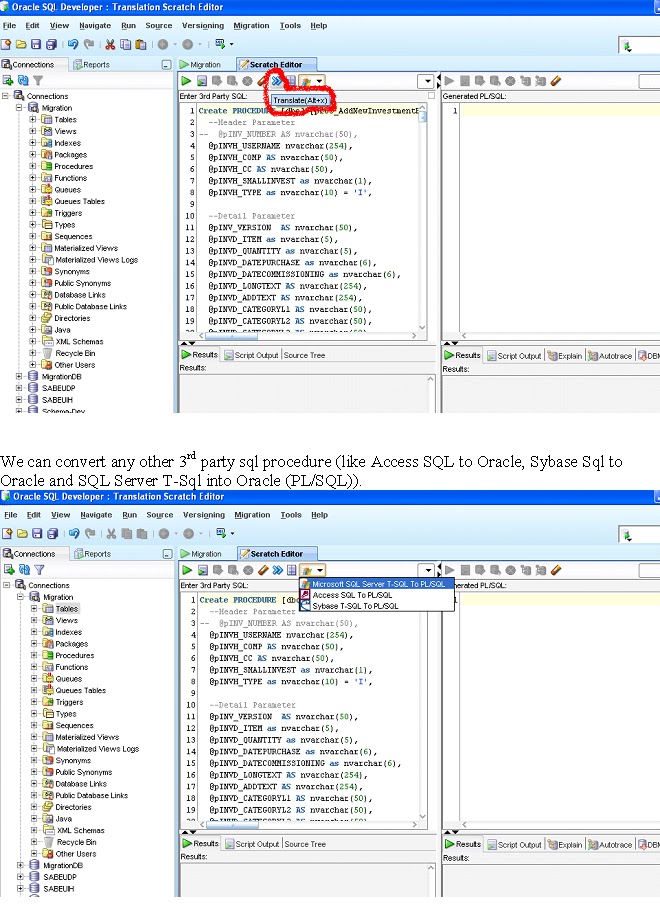
Feasible way to convert SQL Server to Oracle Store procedure

Using Oracle SQL Developer, We can convert any 3rd party SQL procedures into Oracle (PL/SQL)

Sample Example (Convert SQL Server procedure into Oracle) as shown below

Step 1; we have the option in Oracle SQL Developer using Migration menu.

From Migration menu, select Translation Scratch Editor

Refer screen shot below:


Step 2; Get SQL Server stored procedure

Copy the stored procedure from SQL SERVER into Scratch Editor window (3rd party SQL window)


Step 3; Translate SQL Server procedure into oracle

Select translate option as shown below


We can convert any other 3rd party sql procedure (like Access SQL to Oracle, Sybase Sql to Oracle and SQL Server T-Sql into Oracle (PL/SQL)).


Step4: Output

The procedure automatically translates from SQL procedure into Oracle (PL/SQL) procedure.


Parallel programming

Sunday, November 7, 2010

Uploading Images To DataBase

Refer this below link
http://www.aspfree.com/c/a/ASP.NET/Uploading-Images-to-a-Database--C---Part-I/

The New Features in C#4.0

Refer this below link for C# 4.0 featues
http://www.simple-talk.com/dotnet/visual-studio/the-new-features-in-c4.0/

Sunday, October 31, 2010

Windows Setup And Deployment

Refer the following below link
http://www.dotnetfunda.com/articles/article926-windows-setup-and-deployement-using-visual-studio--part-1-.aspx

Monday, October 25, 2010

Comparison Between Candidate Key & Surrogate Key

A very good artical On candidatekey & Surrogate Key in Sql Databse.

Candidate  key is an attribute or a combination of attributes that uniquely identifies each row in the table .


Surrogate Key is  an artificially generated unique identifier, which has no relation to the table data .
 A key with no business meaning .


Refer :
http://www.sqlservercentral.com/articles/Primary+key/70747/
http://www.agiledata.org/essays/keys.html

Saturday, October 23, 2010

Application Compatibility When Migrating to Internet Explorer 8

Fixing the issues while migrating from IE 6 to IE 8
refer the following MSDN site for handeling the compatibility issues

http://msdn.microsoft.com/en-in/library/ff966502(v=VS.85).aspx

VL Interview Questions

1)Joins
2)How to know in which all stored procedures our table is being used.
3)Difference in stored procedures and functions.
4)IIS version.
5)Viewstate can be used in other page or not.Can we store an object in viewstate directly or we have to do any modification for it.
6)If we have Master Page in a page then what r the steps in which it will fire when we debug.
7)At what stage themes are applied to the page.
8)Can we have two Web.config files in an application.
9)If we remove the web.config file from the application what will happen
10)If we have a webservice and yahoo is using its methods then how to block yahoo from using it?
11)Difference between WCF and Web services.
12)What is the script file used for validations.
13)How to avoid flickering on page.
14)Types of sessions.
15)What is rendering
16)How to make a button click event fire on third click.
17)How can we see the viewstate is not tampered.
18)Did i use var in c#.net
19)can we access the session created in asp page in an asp.net page.
20)What is the difference between IsPostBack and AutoPostback.In which purpose we use them.
21)What r the measures i take when i host a web application on server.

Thursday, October 21, 2010

Crystal Reports

http://www.docstoc.com/docs/57964291/CR

MVC Book


http://www.docstoc.com/docs/57964088/MVC1
http://www.docstoc.com/docs/57964088/MVC2
http://www.docstoc.com/docs/57964093/MVC3

Net Book

http://www.docstoc.com/docs/57964407/Net

Recently Asked Interview Questions

Name = Computech
===============
1)define generics and what is namespace used for generics
2)use of sealed,overriding,internal keywords
3)what would be the output of left outer join and inner join
4)how do you measure performance of query
5)how do you debug javascript in 3.5 framework
6)what is a base class
7)how to put an assembly with same name with different version in the same folder
8)what is shadowing?
9)what is hiding?

 Name = sparsh communications
=========================
1)how to throw exception in wcf
2)how to implement crosspage submission
3)howmany session modes are there
4)how to call constructors from base class
5)how to call webmethod
6)how to implement file cache dependency
7)use of postback url property

Name = cybage
===========

1)what are check and uncheck constraints in c#
2)can we call views in functions
3)validate a email id using javascript
4)what is use of IsPostback property
5)In which page life cycle event we use view state
6)what is the difference between truncate and delete
7)what is extension for strong name
8)can we put com components in GAC
9)explain page life cycle events
10)what is use of sealed keyword
11)what function we will writing in each of the layers in MVC
12)what are generics and types of funcitons in generics
13)what is syntax of overriding
14)what is shadowing and write a code for using it
15)what is use of Dictionary and Hashtable in c#
16)what validations you have used either server side or client side and whether server side
   validation is existing or not?


1)what is the repository used to store application
2)difference between readonly and constant
3)can we use more than one web.config
4)difference between remoting and webservices
5)can we use object developed using remoting in java
6)if the same file is to be used at a time how do you use it
7)what tool is used to configure roles(.net framework, WAT, IIs registration)
8)can global users access the application, if it is given as windows authentication
9)how dataset trasmits
10)can we store heterogenous database values in dataset
11)use of xml serialization
12)what authentication is used to check roles(basic,digest,client certificate)
13)IsUserConnected is the property of (server,session,request,response)
14)scenario for using delegate
15)how to hide a table
16)what collection classes have you used
17)what are various types of datatransferring methods from one form to another form
18)how to check whether howmany people have visited application after deploying in iis?
19)what is css sprite?
20)what are the things we need to take care of while using Css?
21)what is escalation ?
22)when two multiple catch blocks are there and it as to raise exception in 2 catch
  block then will it directly pass to 2 catch block or it will pass from 1st catch block?
23)how many times application start event will be fired once we deploy application in IIS?


Site For Asp.Net Online Test

http://www.prashn.org/

Counting Lines & Spaces In Uploading

Counting Lines & Spaces In Uploading

if (FileUpload1.HasFile)

{

FileUpload1.SaveAs("C:\\Documents and Settings\\user155\\Desktop\\navas\\" + FileUpload1.FileName);
}

Microsoft.Office.Interop.Word.Application ObjWord = new Microsoft.Office.Interop.Word.Application();
object falseValue = false;
object trueValue = true;
object missing = Type.Missing;
object saveobjections = Microsoft.Office.Interop.Word.WdSaveOptions.wdDoNotSaveChanges;
Microsoft.Office.Interop.Word.Document wrdoc;
object filepath = ("C:\\Documents and Settings\\user155\\Desktop\\navas\\" + FileUpload1.FileName);
wrdoc = ObjWord.Documents.Open(ref filepath, ref missing, ref trueValue, ref missing, ref missing, ref missing, ref missing, ref missing, ref missing, ref missing, ref missing, ref missing, ref missing, ref missing, ref missing, ref missing);
Response.Write(wrdoc.ComputeStatistics(Microsoft.Office.Interop.Word.WdStatistic.wdStatisticLines, ref missing));
ObjWord.Documents.Close(ref saveobjections, ref missing, ref missing);
ObjWord.Quit(ref saveobjections, ref missing, ref missing);


this coding counting lines withspace while uploading doc file. i want ocunting lines without space?