Refer this below link :
http://support.microsoft.com/kb/907273
http://support.microsoft.com/kb/907273

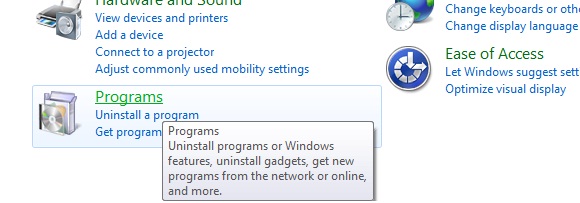
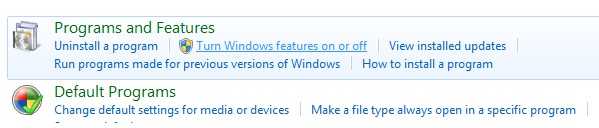
Now go to Internet Information Services and then :
Expand Web Management Tools, expand IIS 6 Management Compatibility, and then select the IIS 6 Metabase and IIS 6 configuration compatibility check box.
Expand World Wide Web Services, expand Application Development Features, and then select the ASP.NET check box.
Expand World Wide Web Services, expand Security, and then select the Windows Authentication check box.
To enable Visual Studio to debug applications, you must configure IIS 7.0 with the Windows Authentication module. By default, the module is not configured as part of IIS.
Click OK to start the IIS and ASP.NET installation process.

SELECT CompanyID,CompanyName,AmountFROM COMPANIES WITH (FORCESEEK(Idx_Company(CompanyID)))WHERE CompanyID = 1 Select OH.OrderID,OD.ItemName,OH.OrderCostfrom OrderHeader OHINNER JOIN OrderDetails OD WITH (FORCESCAN) on OH.OrderID = OD.OrderID 3:OVER Clause is enhanced to apply aggregate functions while applying "Order By"SUM(Amount) OVER (PARTITION BY CompanyID ORDER BY Year)1: IMG height="30" alt="" src=BuildCaptcha.aspx width="80">
2: asp:TextBox runat="Server" ID="txtCaptcha">
3: <asp:Button runat="Server" ID="btnSubmit"
4: OnClick="btnSubmit_Click"
5: Text="Submit" />
6: 7: 3. On “btnSubmit_Click” place the following code 8: 9: if (Page.IsValid && (txtCaptcha.Text.ToString() ==
10: Session["RandomStr"].ToString()))
11: {12: Response.Write("Code verification Successful");
13: }14: else
15: {16: Response.Write( "Please enter info correctly");
17: }Create one more page with BuildCaptcha.aspx 1: Bitmap objBMP = new Bitmap(60, 20);
2: Graphics objGraphics = Graphics.FromImage(objBMP); 3: objGraphics.Clear(Color.Wheat); 4: objGraphics.TextRenderingHint = TextRenderingHint.AntiAlias; 5: 6: 7: //' Configure font to use for text
8: Font objFont = new Font("Arial", 8, FontStyle.Italic);
9: string randomStr = "";
10: char[] myArray = new char[5];
11: int x;
12: 13: //That is to create the random # and add it to our string
14: Random autoRand = new Random();
15: for (x = 0; x < 5; x++)
16: { 17: myArray[x] = System.Convert.ToChar(autoRand.Next(65,90)); 18: randomStr += (myArray[x].ToString()); 19: } 20: 21: //This is to add the string to session, to be compared later
22: Session.Add("RandomStr", randomStr);
23: 24: //' Write out the text
25: objGraphics.DrawString(randomStr, objFont, Brushes.Red, 3, 3); 26: 27: //' Set the content type and return the image
28: Response.ContentType = "image/GIF";
29: objBMP.Save(Response.OutputStream, ImageFormat.Gif); 30: objFont.Dispose(); 31: objGraphics.Dispose(); 32: objBMP.Dispose(); using System.Windows.Forms; namespace CodeKicks.WinApp.Machine { public static class MyMachineHelper { public static void DoHibernate() { //Application.SetSuspendState(PowerState.Suspend, true, false); Application.SetSuspendState(PowerState.Hibernate, true, false); } } }
Public Shared Function InitImageListFromDirectory(pDirectory As String) As ImageList
  Dim imageList As New ImageList()

  For Each f As String In System.IO.Directory.GetFiles(pDirectory)
    Try
      Dim img As Image = Image.FromFile(f)
      imageList.Images.Add(img)
        ' Out of Memory Exceptions are thrown in Image.FromFile if you pass in a non-image file.
    Catch
    End Try
  Next

  Return imageList
End Function


